CalApp App Icon - Private Calorie Tracker for iOS
OpenRouter Free Model Engine

CalApp

A private, local-first food awareness and nutrition companion for iOS. Photograph your meal, receive instant AI calorie estimations, and build healthy habits without tracking servers.

100% Local-First Storage
Dynamic Free Vision AI Models
Hardware Keychain Encryption

How to Use CalApp

Follow this simple step-by-step walkthrough to get started tracking meals and calories in minutes.

1

Connect Your Free OpenRouter Key

CalApp connects directly to OpenRouter to utilize zero-cost vision and multimodal models. Tap the Settings gear icon in the top right to configure your API key.

  • Automatic Model Discovery: CalApp scans all available free-tier models (DeepSeek, Qwen 2.5/3 VL, Llama 3.3, Mistral) and automatically selects the highest-scoring candidate.
  • Auto-Rotation on Rate Limits: If a free model reaches its rate limit, CalApp gracefully falls back to the next available free model with automatic 90s cooldown penalties.
  • Hardware Security: Your API key is encrypted directly in your iPhone's Secure Enclave Keychain and is never synced or stored on any intermediary server.
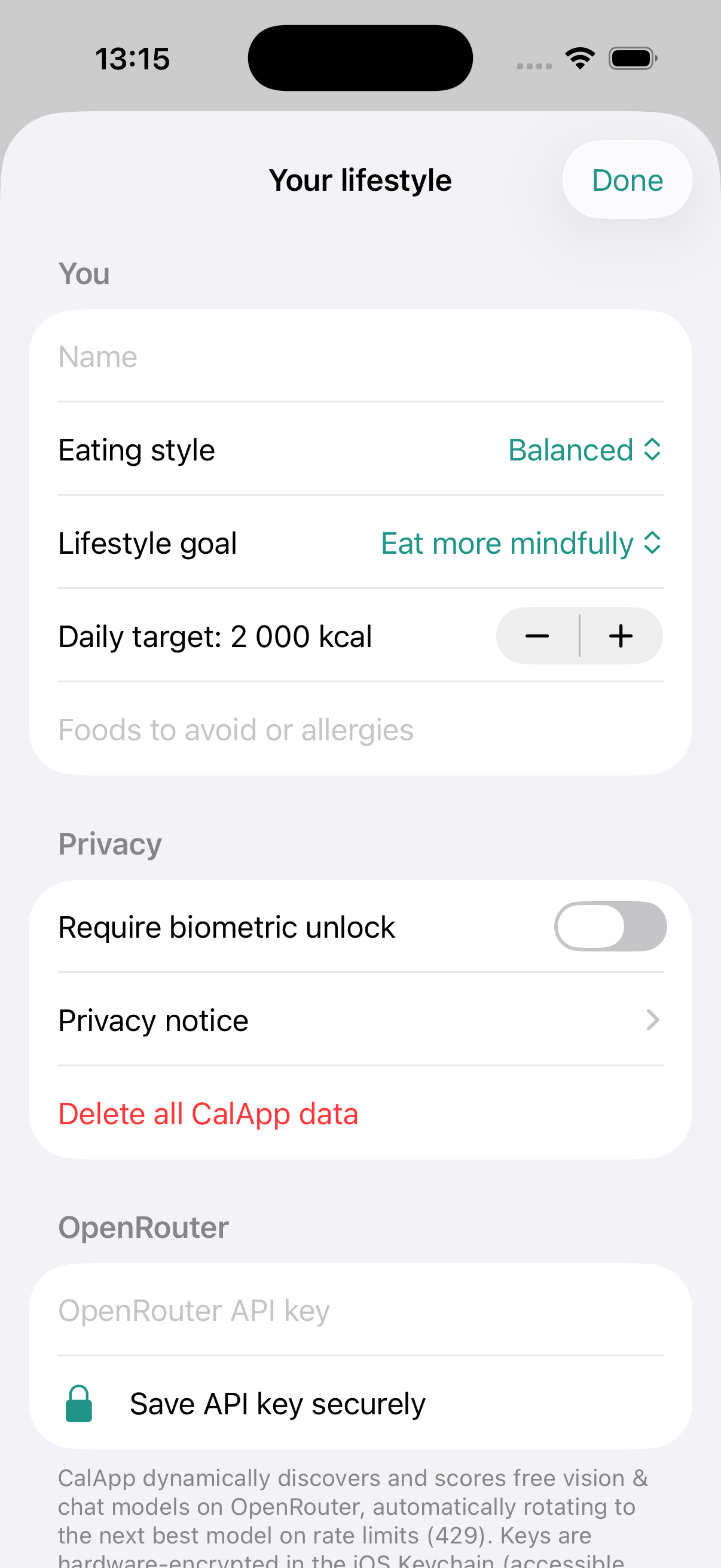
CalApp Settings Screen with OpenRouter Free Vision Model Engine
2

Photograph or Pick Your Meal

Whenever you eat, simply snap a quick photo with your camera or select an existing food image from your Photos library.

  • One-Tap Camera Access: High-resolution camera integration with instant shutter capture.
  • Smart Pre-Processing: Photos are automatically optimized and compressed client-side before analysis for minimal data usage and fast inference.
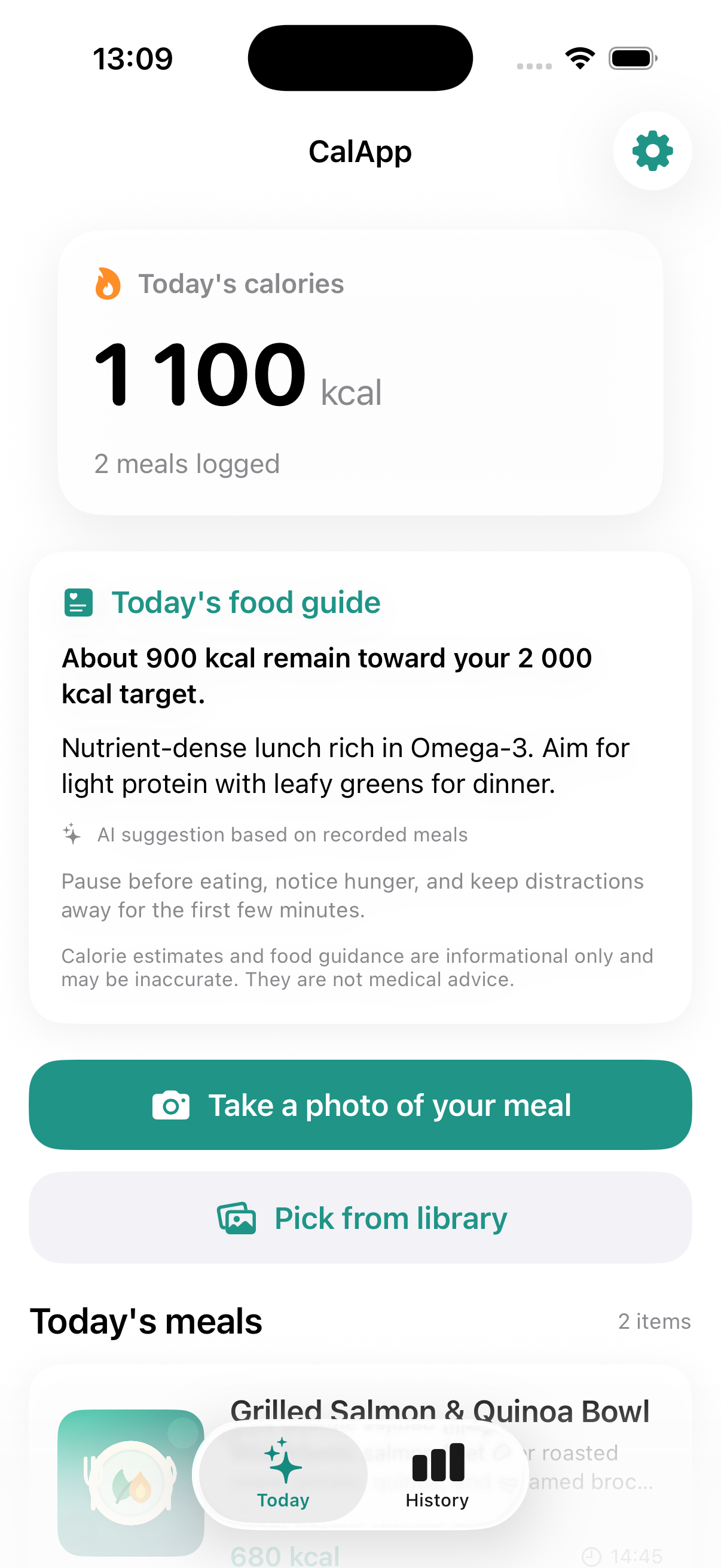
  • Today's Live Calorie Meter: Your daily calorie total and remaining budget update in real time at the top of your dashboard.
CalApp Today Dashboard with logged meals and live calorie summary
3

Add Context & Review Privacy

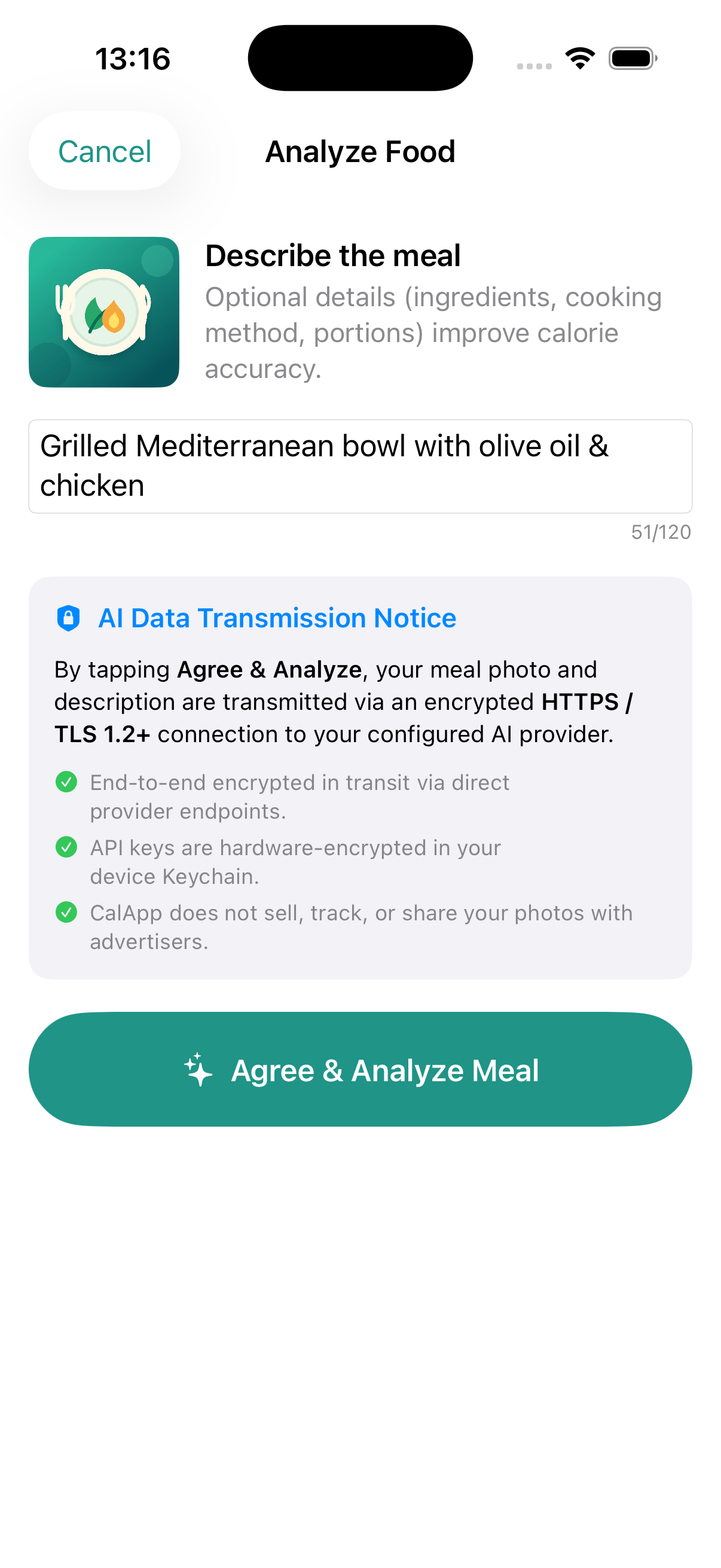
Before sending the meal for estimation, you can provide optional notes such as portion sizes, cooking methods, or hidden ingredients (e.g. olive oil dressing, oat milk).

  • Contextual Accuracy: Adding details like "steamed vs. fried" or "gluten-free crust" helps the AI provide higher-confidence calorie estimations.
  • Explicit Transmission Transparency: Review the active AI model name and direct TLS 1.2+ end-to-end encryption disclosure before tapping Agree & Analyze.
  • Zero Tracking: CalApp never sells, tracks, or shares your photos with third-party data brokers or advertisers.
Meal Description and AI Data Transmission Privacy Dialog
4

Instant Calorie Breakdown & AI Advice

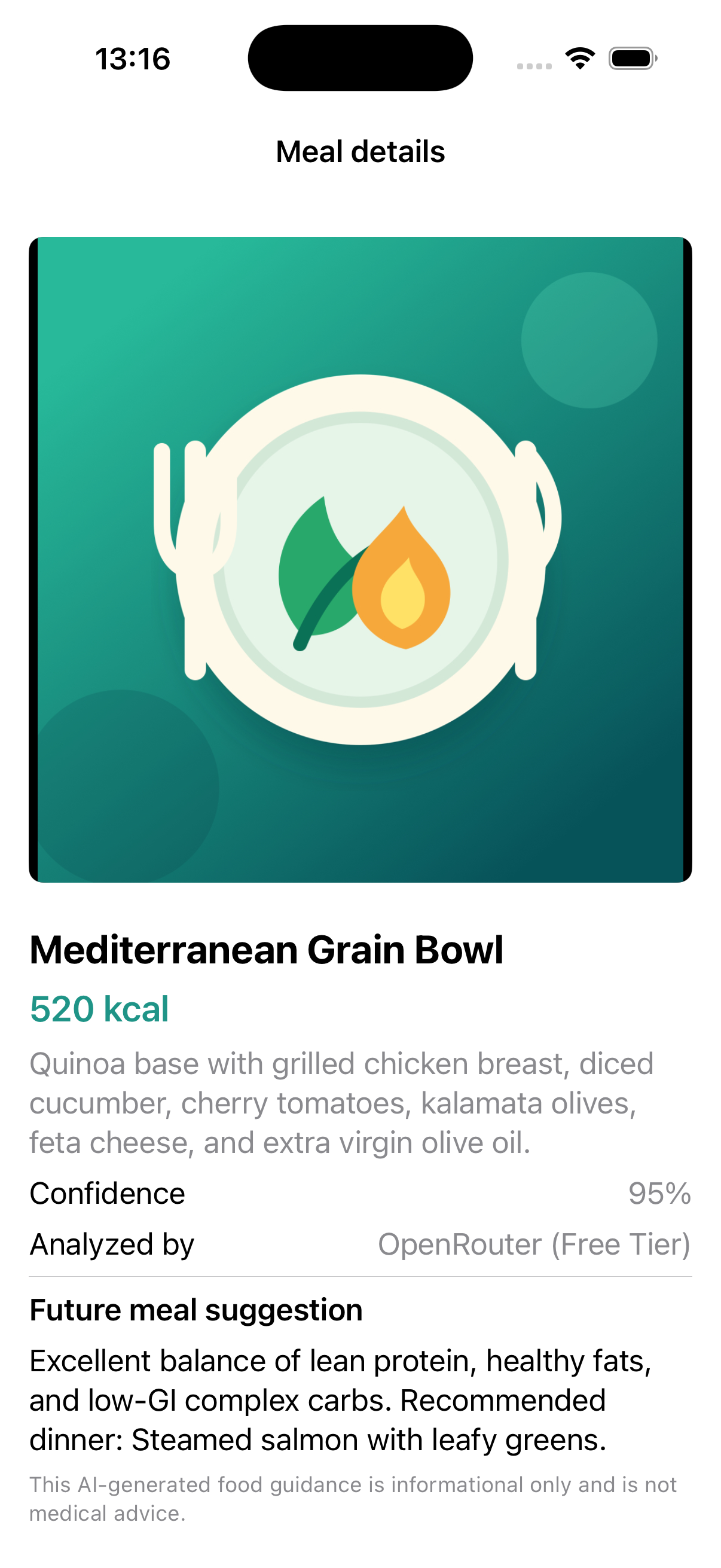
Within seconds, CalApp delivers an itemized calorie count, ingredient identification, confidence percentage, and tailored future meal advice.

  • Detailed Nutritional Insights: Discover estimated macronutrient balance (proteins, carbs, healthy fats) and calorie distribution.
  • Adaptive Meal Suggestions: Receive personalized next-meal recommendations shaped by your daily targets and dietary goals (e.g. Balanced, Low Carb, Vegan, Mediterranean).
  • Adjustable Timestamps: Backdate or edit meal timestamps at any time if you logged a meal after eating.
CalApp Meal Detail View with breakdown and future meal advice
5

Track History & Review Trends

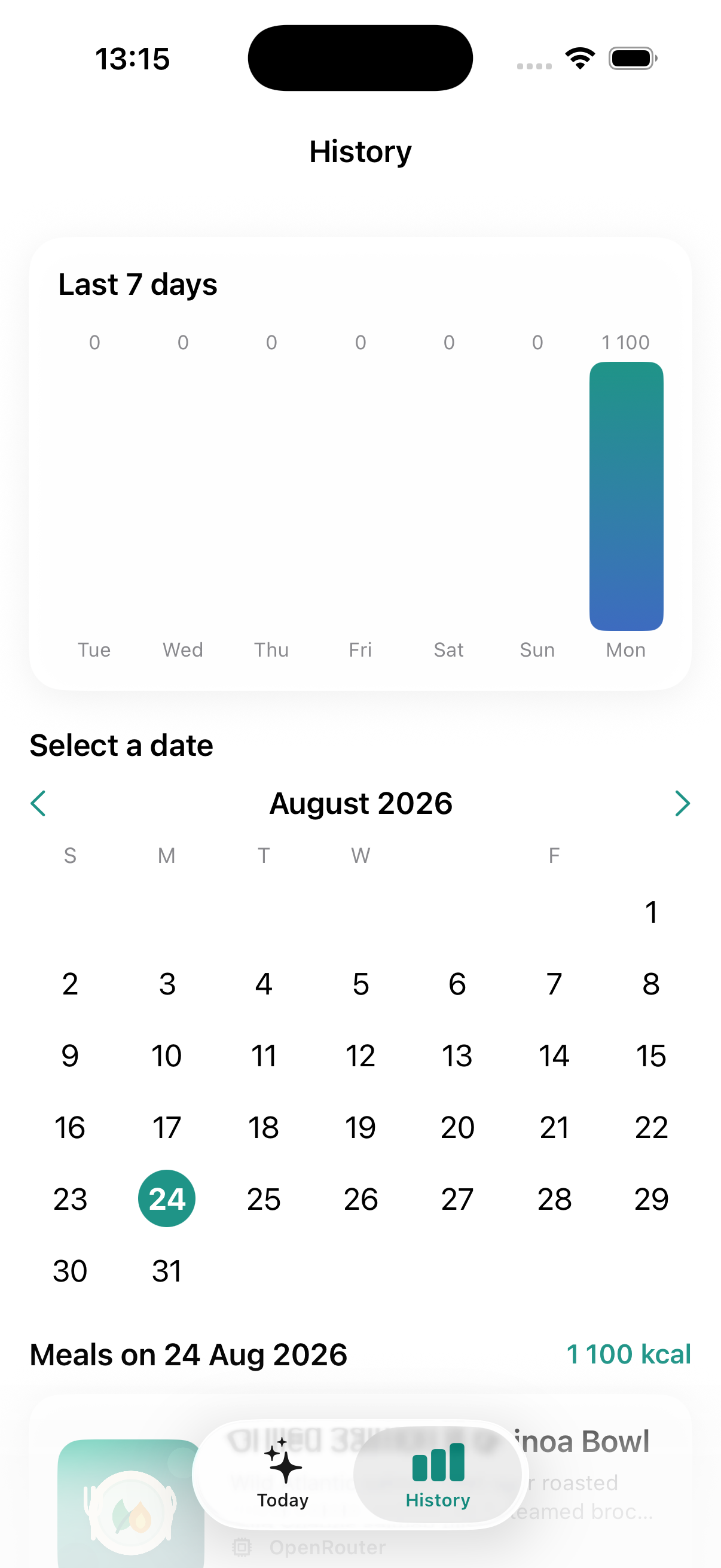
Switch to the History tab to review previous days, inspect weekly calorie trends with interactive charts, and monitor long-term nutritional consistency.

  • Weekly Calorie Charts: Visual bar graphs comparing daily consumption against your target.
  • Interactive Calendar: Select any past date to view full meal logs, dish descriptions, and photos recorded on that day.
  • One-Tap Complete Wipe: Total control over your data — clear individual meals or execute a permanent local sandbox wipe in Settings.
CalApp History View with weekly caloric breakdown charts

Settings Guide

Customize your caloric targets, nutritional philosophy, allergy guardrails, and AI provider engine in CalApp Settings.

Profile & Calorie Target

Set your name for personalized app greetings and configure your daily caloric baseline. The calorie target directly drives your dashboard progress ring and remaining allowance.

Profile Name Optional (e.g. Alex)
Calorie Target 500 – 5,000 kcal / day (Default: 2,000)
Live Metric Remaining kcal = Target - Consumed

Dietary Philosophy & Goals

Select your nutritional paradigm and fitness goal. The AI engine injects these preferences into every analysis prompt to calculate relevant meal recommendations.

Diet Types Balanced, Low-Carb/Keto, High Protein, Mediterranean, Vegan
Lifestyle Goals Mindful, Muscle Gain, Fat Loss Deficit, Maintenance

Allergies & Avoidances

Flag ingredients you are allergic to or actively avoiding. The AI meal reviewer inspects food photos for traces of these items and excludes them from future suggestions.

Common Allergens Dairy, Gluten, Peanuts, Tree Nuts, Shellfish, Soy, Eggs
Custom Avoidance Added Sugars, Seed Oils, Alcohol, etc.

OpenRouter AI Engine

Manage your free OpenRouter API key. CalApp queries the OpenRouter model registry in real time, prioritizes free vision models, and manages rate-limit cooldowns.

API Key Storage iOS Keychain (Hardware Encrypted)
Free Models DeepSeek, Qwen 2.5/3 VL, Llama 3.3, Mistral
Rate Limit Handler Auto-fallback + 90s exponential cooldown

Data Management & Sandbox Reset

CalApp gives you 100% data sovereignty. Because all meal records and photos reside exclusively on your local iPhone sandbox, you have full control over data retention.

Delete All CalApp Data Instantly unlinks and purges all photos, meal records, and history from local storage
Remove API Key Clears your encrypted OpenRouter key from the iOS Secure Enclave Keychain
App Uninstall Deleting CalApp removes the iOS application sandbox completely

Built Around Your Privacy

Designed from the ground up as a native, local-first iOS app.

No Central Servers

There is no CalApp user database or account system. All meal logs, dietary preferences, and photo files remain strictly on your iPhone.

Keychain Security

API keys are saved using iOS Keychain with hardware-backed encryption accessible only when your device is unlocked.

Free AI Ecosystem

Seamlessly access high-performance open-weight vision models without recurring subscription fees or proprietary lock-in.

Got Questions?

Where do I get an OpenRouter API key?

You can create a free account at openrouter.ai, generate an API key in your dashboard, and paste it into CalApp Settings. OpenRouter offers zero-cost access to multiple top vision models.

Are my meal photos stored on OpenRouter?

Photos are transmitted directly via encrypted HTTPS for real-time inference and are processed according to OpenRouter's zero-retention policies for free-tier completion endpoints.

What happens if a free model is rate limited?

CalApp features automated rate-limit detection (429/503). It places the congested model in a temporary 90-second cooldown and automatically falls back to the next best available free model.

How do I delete all my stored data?

Open CalApp Settings, scroll to the bottom, and tap Delete All Meals & Data. You can also simply delete the app from your iOS home screen to immediately purge the entire application sandbox.

Ready to take control of your food awareness?

CalApp is distributed natively for iOS. No logins, no ads, no cloud lock-in.